
Bundling and Minification: An Introduction
Great website performance is a key part of good user experience: pages should load quickly so users aren't left staring at a loading indicator or a blank page.
The time it takes to render a web page mainly depends on four factors:
- Network latency
- Available bandwidth
- Number of HTTP requests
- Size of HTTP requests
We usually don't have any influence on the network latency or bandwidth available to the user, but we certainly do have control over the number and size of HTTP requests. Our goal is to minimize both.
Bundling: Combining Assets Together #
Most browsers only allow a limited number of connections to each host at the same time — usually around 6. This means that many small assets aren't all loaded in parallel; instead, the requests are made in sequential batches. (It's a bit like boiling 30 eggs in a pot that only holds 6: you'll have to boil them in 5 batches.)
That's where bundling helps: it merges multiple stylesheet or script files into a single file, reducing the number of HTTP requests the page has to make.
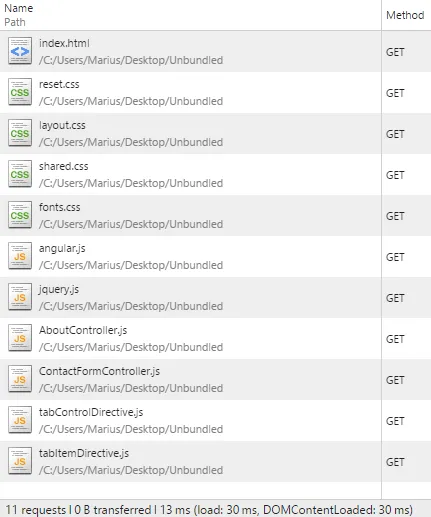
Here's an example: a web page referencing 10 stylesheets and 25 script files requires 36 (1 + 10 + 25) individual requests. That'll take some time! With bundling, that number goes down to 3 (1 page, 1 stylesheet bundle, and 1 script bundle), and those three requests can be made in parallel.
The difference is easy to see in the network tab of your browser's developer tools. First, the unbundled assets:
And here are the bundled versions:
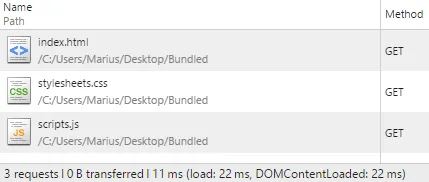
Instead of 10 additional HTTP requests, index.html now makes 2: one for the stylesheet bundle and one for the script bundle.
Minification: Reducing Request Size #
As developers, we format our CSS and JavaScript files to be readable. The browser, however, doesn't care about neat indentation and descriptive names.
To reduce the size of HTTP requests, we can use minification to shorten a file's contents without changing their meaning. That mainly means removing superfluous whitespace and comments, like in the following example:
h2 {
  color: #0000ff;

  /* Make text all-uppercase */
  text-transform: uppercase;
}
Here's the minified version of the above CSS rule. It's about 58% smaller, but browsers treat it exactly the same:
h2{color:#00f;text-transform:uppercase}The whitespace is gone, and so are the comment and the final semicolon. The hex color value has been shortened, too, but still describes the same color. For a real-world example, check out the stylesheet bundle of this very blog.
In the case of JavaScript, there's a little more room for improvement: minifiers can also shorten identifiers (variable names, function names, …) wherever renaming them is safe.
Summary #
Bundling and minification improve a web page's performance by reducing the number and size of the assets it references.
For a thorough introduction to bundling and minification, check out this Bundling and Minification guide. It includes some helpful visualizations of the bottlenecks that can occur when loading a web page.